TimePilot iPhone App Case Studies
How can you use the TimePilot iPhone App? Here are four
fictional examples:
The background
 Joe Smith owns a small company, Riverville Software. Dana
Lawson, one of his best technical support people, recently had a
baby, so for the next few months she will work from home. From 9
a.m. to 2:30 p.m. Monday through Friday she will answer e-mailed
questions from customers. Joe uses TimePilot Vetro at his headquarters. Dana is paid by
the hour and owns an iPhone.
Joe Smith owns a small company, Riverville Software. Dana
Lawson, one of his best technical support people, recently had a
baby, so for the next few months she will work from home. From 9
a.m. to 2:30 p.m. Monday through Friday she will answer e-mailed
questions from customers. Joe uses TimePilot Vetro at his headquarters. Dana is paid by
the hour and owns an iPhone.
The challenge
How can Joe keep track of the hours that Dana works?
The solution
The TimePilot iPhone App.
The cost
$3.99.
The process
Dana downloads the TimePilot App from the iTunes App Store and
links it to Riverville Software’s free Dropbox.com account. (Joe
reimburses her for the $3.99 cost of the App.) She uses the App
to clock in and out for the week. At the end of the week, she
taps a button on the iPhone screen to send her clock-in and
clock-out data to TimePilot Central. Within seconds, the data
appears in TimePilot Central on the PC at headquarters, joining
the clock-in and clock-out data collected by Joe’s other
TimePilot products. Joe prepares the data for payroll and Dana
gets her paycheck.
Back to the top of the page
The background
 Andy Krawczyk owns a construction company, AXK Construction. He
has crews at three locations. Two of the crews use TimePilot
Extreme to clock in and out on site. His foreman at the third
site, Larry Jackson, keeps track of the six workers’ hours in a
notebook and at the end of the week copies the data into
TimePilot Central at Andy’s office. Andy would like to automate
the process, because copying the data is time-consuming—Larry
has to drive an hour just to get to the office—and the chances
of a mistake are high. Larry owns an iPhone.
Andy Krawczyk owns a construction company, AXK Construction. He
has crews at three locations. Two of the crews use TimePilot
Extreme to clock in and out on site. His foreman at the third
site, Larry Jackson, keeps track of the six workers’ hours in a
notebook and at the end of the week copies the data into
TimePilot Central at Andy’s office. Andy would like to automate
the process, because copying the data is time-consuming—Larry
has to drive an hour just to get to the office—and the chances
of a mistake are high. Larry owns an iPhone.
The challenge
Moving from a paper-based, error-prone system to an
all-electronic system.
The solution
The TimePilot iPhone App.
The cost
$3.99
The process
Larry downloads the TimePilot iPhone App to his iPhone from the iTunes
App Store and links it to AXK Construction’s free account at Dropbox.com.
(Andy reimburses him for the $3.99 cost of the App.) Using
TimePilot Central, Andy sends the workers’ profiles to Larry’s
iPhone. Within seconds all six names appear in the App.
Each day, it takes just a tap for Larry to clock each worker in
and out. On Thursday, after he’s clocked out, a worker asks
Larry how many hours he’s worked for the week. Larry taps the
worker's name on his iPhone and the App tells him: 35.53 hours.
At the end of the week, Larry taps a button on the iPhone screen
to send the workers’ clock-in and clock-out data to TimePilot
Central. Within seconds, the data appears in TimePilot Central
on the PC at headquarters, joining the clock-in and clock-out
data collected by Andy’s TimePilot Extremes.
Andy prepares the data for payroll and the six workers get paid
for exactly the number of hours they worked. No mistakes, and
Larry is home more than an hour earlier than usual.
Back to the top of the page
The background
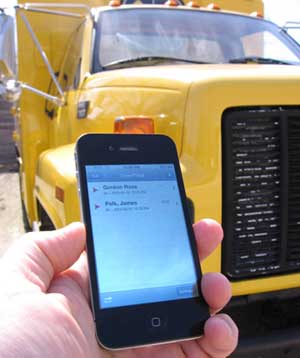 Miriam Gonzales owns a trucking company, San Antonio Freight
Systems. She has 12 trucks, each of whom has a driver and a
helper, both paid hourly. To keep in contact with each driver,
each has been assigned a company iPhone. Miriam currently tracks
time and attendance with log sheets in each truck, but compiling
the data at the end of the pay period takes hours and her
payroll clerk makes occasional mistakes when calculating in
hours and minutes. Because of the mistakes, sometimes employees
are paid less than what they deserve; other times they’re paid too
much. Miriam doesn’t have that problem with her office staff,
because they use TimePilot Vetro.
Miriam Gonzales owns a trucking company, San Antonio Freight
Systems. She has 12 trucks, each of whom has a driver and a
helper, both paid hourly. To keep in contact with each driver,
each has been assigned a company iPhone. Miriam currently tracks
time and attendance with log sheets in each truck, but compiling
the data at the end of the pay period takes hours and her
payroll clerk makes occasional mistakes when calculating in
hours and minutes. Because of the mistakes, sometimes employees
are paid less than what they deserve; other times they’re paid too
much. Miriam doesn’t have that problem with her office staff,
because they use TimePilot Vetro.
The challenge
Make the process more efficient and eliminate math errors for
the drivers and helpers.
The solution
The TimePilot iPhone App.
The cost
$47.88 (the $3.99 TimePilot iPhone App on all 12 iPhones)
The process
Miriam’s office manager gathers up all 12 iPhones, downloads the
TimePilot iPhone App to each and links each to her company’s
free Dropbox.com account. Then she sends the workers’ profiles from
TimePilot Central on her PC to each iPhone. Finally, she
prepares each iPhone by deleting all the workers’ profiles
except for those of the driver and the helper who will be using
each device. She distributes each iPhone (which now contains
only the names of one driver and one helper) to the appropriate
driver.
The drivers and helpers start their shifts, tapping their names
on their iPhone screens to clock in. They clock out with a tap for lunch,
clock back in for the afternoon and clock out at the end of the
day. At the end of the week, each driver taps the "Send to
TimePilot Central" button, and within seconds the driver's and
helper's clock-ins
and clock-outs appear in TimePilot Central on the office
computer. Miriam’s payroll clerk finishes her job in minutes
instead of hours and without any calculation errors.
Back to the top of the page
The background
 Edmund James is an attorney. At any one time, he’s working on an average of six cases. He’s looking for a way to keep track of the billable time he spends on each case. He owns an iPhone and his office staff clocks in and out with TimePilot Vetro.
The challenge
Keep track of billable hours for each of his clients.
The solution
The TimePilot iPhone App
The cost
$3.99
The process
First, a little housekeeping: Edmund has his office manager create a new company called "Clients" in TimePilot Central. The manager creates a profile for each client and assigns them to the Clients company. (By doing this, Edmund keeps his clients segregated and avoids mixing his clients’ billable hours with his employees’ work hours.) The manager then transfers the profiles to Edmund’s iPhone.
When Edmund begins work on a particular case, he starts the TimePilot iPhone App and clocks in the client. When he’s done working on that case and is starting a new one, he clocks out the first client and clocks in the second one. Every week, he sends his transactions to TimePilot Central on his office PC so that the clients can be billed.
Back to the top of the page