TimePilot iPhone App
Clocking in and out with the App
There are two ways to clock in or out:
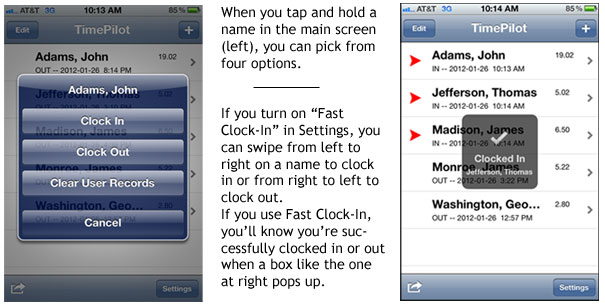
- The first is to tap and hold on the employee's name.
Doing so will bring up a menu that will let you clock in
the employee, clock out the employee or clear (erase)
the employee’s clock-ins and clock-outs.
- The other way is called "Fast Clock-In," which allows
you to clock in or out by swiping the profile’s cell on
the main screen. Swiping from left to right will clock
him or her in; from right to left will clock the
employee out.
Fast Clock-In is turned off by default and must be
enabled in the app’s settings. To do so, tap the
"Settings" button in the lower right-hand corner of the
main view, then tap the switch next to "Fast Clock-In"
to set it to ON. Tap the "Done" button at the top of the
screen to dismiss the view.