TimePilot iPhone App
Deleting Individual Transactions or Employee Profiles in the iPhone App
-
 To delete an individual transaction for a specific
employee, tap the employee’s name in the main view to
view their records, swipe from left to right on the
record you want to delete, then tap the "Delete" button
that appears.
To delete an individual transaction for a specific
employee, tap the employee’s name in the main view to
view their records, swipe from left to right on the
record you want to delete, then tap the "Delete" button
that appears.
-
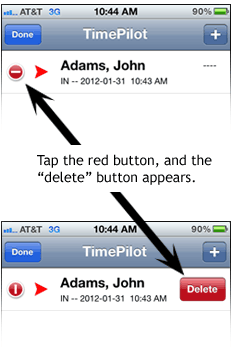
To delete an employee and all of his or her
transactions from the app, tap the "Edit" button in the
upper left-hand corner of the main view to enter editing
mode, then the "minus" button (
 )
. When the "Delete" button appears, tap it. Tap "Done" when finished.
)
. When the "Delete" button appears, tap it. Tap "Done" when finished.
- To delete
all of an employee’s transactions but not
the employee's profile, tap and
hold on the employee’s name in the main view. In the
pop-up that comes up, tap the button that says "Clear
User Records." Then tap "Clear" to confirm.