TimePilot iPhone App
Viewing an Employee's Transactions and Inserting a Transaction
 To see a list of an employee’s clock-ins and
clock-outs, simply tap the employee’s name in the main
view. A list of the employee’s transactions will appear.
"In" transactions have a red triangle next to them. At
the bottom of the screen is the total accumulated hours
for this employee.
To see a list of an employee’s clock-ins and
clock-outs, simply tap the employee’s name in the main
view. A list of the employee’s transactions will appear.
"In" transactions have a red triangle next to them. At
the bottom of the screen is the total accumulated hours
for this employee.
Want to delete a transaction? Swipe the offending transaction
from left to right or right to left, then tap the "Delete"
button that appears.
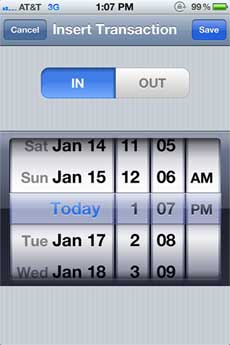
You can also insert a clock-in or clock-out for the
employee here. Tap the + button in the top right-hand
corner of screen. The Insert Transaction screen will
appear (see screenshot at right). Select IN or OUT (a blue background
indicates it has been selected) and the date and time,
and then tap "Save." To cancel the entry, tap "Cancel."