TimePilot Tap
All About TimePilot Tap
How does the system work?
TimePilot Tap is the ultimate portable timeclock. It’s battery powered and
small and light enough to fit in a pocket.
How does it work? Here’s the short explanation:
Employees tap their iButtons to clock-in and -out at the clock. When it’s time
for payroll, you connect the clock to your computer with the included USB cable,
and the data is transferred from the clock to the TimePilot database on your PC.
Supervisors then use the password-protected TimePilot Central software to view
and edit the data, create reports and prepare the data for payroll software or
services.
You can also leave the Tap connected to your PC with the USB cable and use it
as a desktop timeclock. As employees clock in and out, their transactions are
sent instantly to the TimePilot software and their name and clock-in or
clock-out time appear on the PC screen.
If you're using TimePilot Enterprise software, you can use Enterprise's Cloud
feature to connect distant facilities (like a branch office) with
"headquarters." In that usage, a PC at the remote site transmits all the
clock-ins and clock-outs collected by multiple Tap+ clocks up to "the
Cloud," where TimePilot
Central at headquarters will find it and download it into the TimePilot
database. For details,
click here.
And here’s a little more detail about how Tap works as a portable timeclock:
|
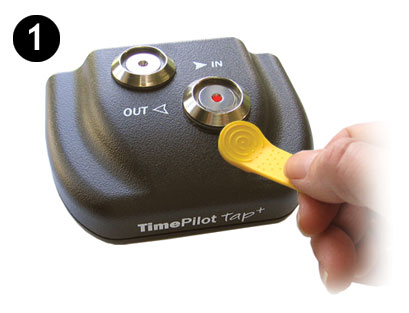
When employees tap their iButtons to the battery-powered Tap, the clock
saves three things to its memory: the iButton’s serial number (which identifies
the employee), the time and date and whether it’s a clock-in or a clock-out.
The clock’s memory can handle up to 12,000 clock-ins and clock-outs. Its battery
should last a year before it needs to be recharged. |
 |
|
|
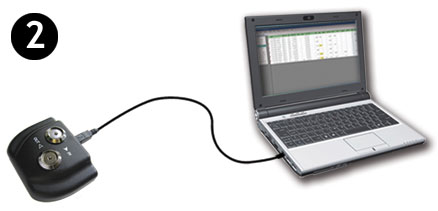
When it’s time to do payroll, you’ll move those clock-ins and clock-outs from
the clock to the TimePilot software. That’s done by first starting up the
"TimePilot Tap Manager," which is a small software program that acts as the
go-between for your Tap clock and your computer. Then you connect the Tap
clock to your computer with the included USB cable. |
 |
|
|
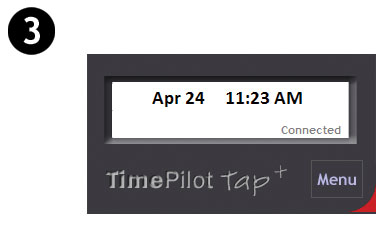
Immediately, the Tap Manager moves the clock-ins and clock-outs into the
TimePilot database on your computer (or on your server—you choose the location
when you set up TimePilot Central). And at the same time, as long as the clock
is connected by cable to the computer, the battery is being recharged and the
date and time on the clock is synchronized to match the time on the computer. |
 |
|
|
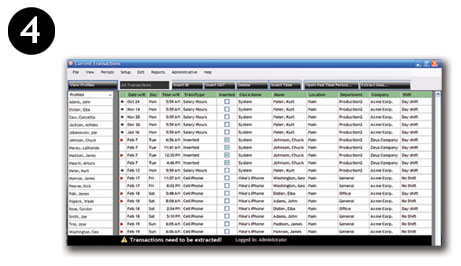
To see the clock-ins and clock-outs (also called "Transactions"), start
TimePilot Central. This password-protected software performs all the
calculations and lets supervisors correct, insert and delete clock-ins or
clock-outs, as well as create reports and prepare the data for payroll. |
 |