
The TimePilot Vetro clock is attached to a wall and powered by a nearby electrical outlet. Employees can clock in and out in two ways: by tapping their iButton to the “In” or “Out” probes at the bottom of the clock; or by entering a four-digit ID code and pressing the “In” or the “Out” button on the clock’s keypad.
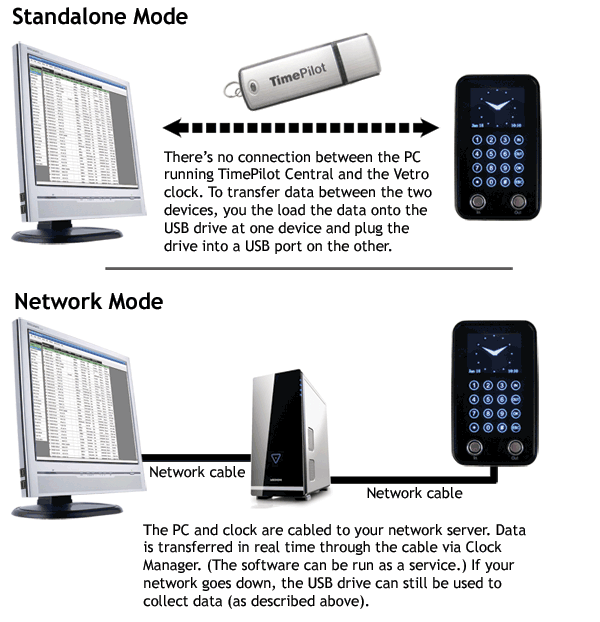
There are also two ways for supervisors to collect the clock-in and clock-out data:
Once your clock-in and clock-out data is in the TimePilot database, supervisors can use the TimePilot 5 management software to review the data, make any corrections necessary, generate reports and prepare it for payroll. To learn more about the software and to see a series of screenshots, click here.
TimePilot Corporation guarantee*
If you are dissatisfied for any reason during the first 30 days after you purchase a TimePilot
Vetro system from TimePilot Corporation, we will refund the purchase price if you return
the system to us, freight prepaid and insured for the value of the system. If you choose this
option, we hope that you will take a few minutes to help us understand why you're dissatisfied.
Please be sure to call us for an RMA (Return Merchandise Authorization) number before returning
the system. We can be reached at 630.879.6400.
TimePilot Corporation warranty*
For one year after you purchase a TimePilot Vetro System, we will repair or replace (at our discretion)
any malfunctioning hardware. The purchaser pays only the shipping to return the malfunctioning part to us.
*Note: The money-back guarantee and warranty are void if the system is returned in a damaged state for any reason, including damage that occurs because of a failure to follow installation instructions.